You’re selling on Shopify and now want to reach customers beyond your storefront, on your blog, a partner’s website, or a landing page. The Shopify Buy Button is probably the first thing that comes to mind. It’s built by Shopify, it’s free, and it sounds like exactly what you need.
However, is it really enough? It gets the job done at a basic level, but it quietly costs you sales in ways you don’t immediately notice.
So, what about a Shopify Buy Button alternative? In this post, we’re doing an honest side-by-side comparison of the Shopify Buy Button and EmbedUp, a newer Shopify app. It is built specifically for merchants who want to sell everywhere, track everything, and convert better. By the end, you’ll know exactly which tool fits where you are right now.
Table of Contents
What is The Shopify Buy Button?
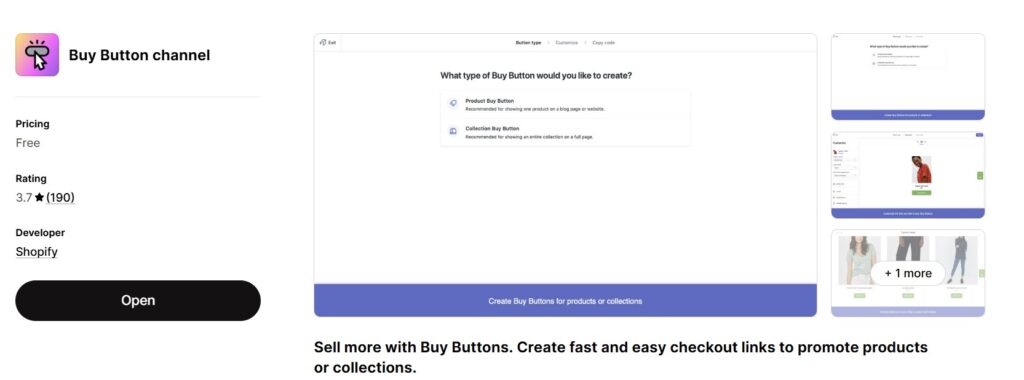
The Shopify Buy Button is Shopify’s official way to embed products on external websites. You select a product, copy a code snippet, and paste it into any site that accepts HTML, WordPress, Wix, Squarespace, a landing page, wherever.
It’s straightforward, reliable, and backed by Shopify. For merchants who just want a basic “Buy Now” button on a single page without any setup complexity, it does exactly what it promises.
The problem isn’t what it does. It’s what it can’t do and for growing merchants, that list gets long quickly.
Where The Shopify Buy Button Falls Short
This isn’t about bashing a free tool. The Buy Button was built for simplicity, and simplicity has a ceiling. Here’s where merchants typically hit that ceiling:
Checkout kicks shoppers off your page. Every single time. When a customer clicks Buy, they get redirected to Shopify’s domain to complete the purchase. They leave your blog, your landing page, your partner’s site. That break in flow is a real drop-off point. You were so close to the sale.
Customization requires a developer. Beyond basic color changes and button text, you’re stuck. Want to match the embed to a partner site’s branding? Want a different layout for a landing page? You’ll need to write code or hire someone who can.
No affiliate or partner tracking. If you work with bloggers, influencers, or partner sites who embed your products, the Buy Button gives you zero visibility. You can’t see which partner drove which sale, which embed converted, or which collaboration is worth renewing. You’re essentially flying blind.
No bundle support. If you want to sell three products together as a “Starter Pack”, the Buy Button can’t do it. Single products or full collections only.
No per-embed attribution. Even if you embed your own products across ten different blog posts, you can’t tell which post is driving sales. No UTM automation, no component-level data, nothing.
For merchants who are serious about selling beyond their storefront, these aren’t minor inconveniences. They’re real revenue gaps.
Here is the full list of Shopify Buy Button alternatives. Check what suits your store best.
What is EmbedUp?
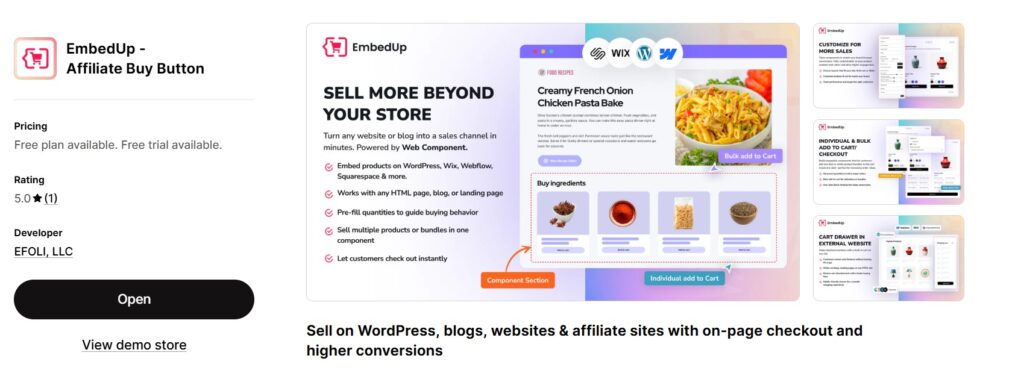
EmbedUp, Shopify Buy Button alternative, is an app built for merchants who want to sell everywhere, on their blog, on partner and affiliate sites, on landing pages, anywhere with HTML. You can also track and optimize those sales.
Like the Buy Button, it works by generating an embed code you paste into any external site. But what happens before and after that embed is completely different.
You build your product component using a no-code builder
- Set title and description
- Set up cart behavior – Buy Now (Checkout) or Add to Cart
- Choose your products or collection
- Set checkout type – Individual or Bulk
- Set Layout Preview – List, Grid, and Grid Slider
- Customize the layout – Design to match any site’s branding
- Add tracking – Custom tracking code, UTM Source, UTM Medium, and UTM Campaign
- You can also assign this for a specific market.
This one script will work across WordPress, Webflow, Wix, Squarespace, Ghost, or any custom site. Everything stays synced with your Shopify store in real time; prices, inventory, variants, all of it.
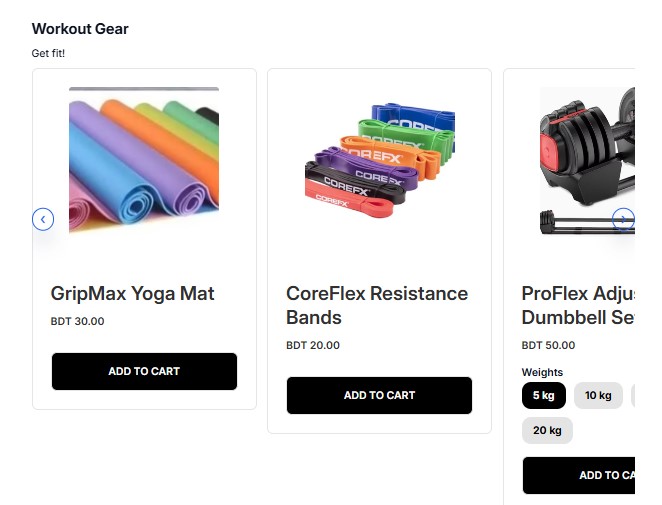
This is what your customers will see in a blog page.
One thing worth mentioning: if you already use a Shopify bundle app to create product kits, EmbedUp now supports those bundles too. This was one of the most requested fixes from merchants after launch, and the team shipped it. So if you’ve built bundles using another Shopify app, you can embed them directly through EmbedUp without rebuilding anything.
Pricing:
- The free plan gets you started with one component and up to three products.
- The Growth plan ($14.99/month) unlocks up to ten components, bundle creation, advanced customization, and bulk checkout.
- The Pro plan ($29.99/month) adds affiliate management, commission tracking, UTM attribution, and full sales reporting per partner and campaign.
A 5-day free trial is available on paid plans. No credit card needed.
What Features EmbedUp Brings to the Table
Embedding & Components
- Embed products, collections, or bundles on any external site
- No-code component builder with live preview
- One embed script works on WordPress, Webflow, Wix, Squarespace, Ghost, and any site with HTML
- Copy and paste embed code
- Real-time sync with Shopify; prices, variants, and inventory always up to date
Customization
- Flexible layouts, colors, and CTAs
- Custom button text and options
- Advanced customization + custom CSS (Growth & Pro plans)
Checkout & Cart
- Individual product add to cart
- One-click add all items to cart (Growth & Pro plans)
- Direct checkout option
- Cart drawer on external websites
- Inventory check before checkout (Growth & Pro plans)
Bundles & Quantities
- Preset bundle creation with fixed products and quantities (Growth & Pro plans)
- Set default quantities per variant (Growth & Pro plans)
- Third-party bundle app support (recently added)
Affiliate & Partner Management
- Create and manage affiliate partners (Pro plan)
- Assign components to specific affiliates (Pro plan)
- Track affiliate sales and commissions (Pro plan)
- Affiliate performance analytics (Pro plan)
Tracking & Analytics
- Campaign analytics with UTM tracking (Pro plan)
- Order-level attribution and reporting (Pro plan)
- Sales attribution per embed or partner (Pro plan)
Shopify Buy Button vs EmbedUp: Feature Comparison
Here’s how the two tools stack up on the things that matter most to Shopify merchants:
| Feature | Shopify Buy Button | EmbedUp |
|---|---|---|
| Embed anywhere | ✅ | ✅ |
| On-page checkout | ❌ Redirects to Shopify | ✅ Stays on page |
| No-code customization | ❌ Very limited | ✅ Full builder |
| Affiliate & partner tracking | ❌ | ✅ Built-in |
| Bundle/kit support | ❌ | ✅ |
| UTM tracking | ❌ Manual only | ✅ Automatic |
| Real-time Shopify sync | ✅ | ✅ |
| Per-embed sales attribution | ❌ | ✅ |
| Free plan available | Free | ✅ |
| 5-day free trial | – | ✅ |
The two biggest differences in plain terms:
- EmbedUp keeps checkout on the page where the customer already is
- It tells you exactly which embed, partner, or campaign drove each sale.
For merchants trying to grow beyond a single storefront, those two things alone change the game.
Real-World Use Cases
Use Case 1:The Fitness Blogger Selling Gear
A fitness merchant runs a workout blog on WordPress alongside their Shopify store. They write a guide on at-home workouts and want to recommend the gear they sell, resistance bands, a yoga mat, and a foam roller.
With the Buy Button, they can embed individual products, but the checkout redirects readers away from the blog mid-flow. With EmbedUp, the gear appears right inside the workout guide as a clean product block. Readers browse, add to cart, and check out without leaving the article. The momentum stays intact.
If you want to see exactly how this setup works on WordPress, we wrote a full walkthrough here: How to Embed Shopify Products in WordPress for Fitness Blogs.
Use Case 2: The Merchant With Affiliate Partners
A merchant works with five bloggers who each embed their Shopify products on their own sites. With the Buy Button, there’s no way to know which blogger is driving sales. Are all five worth the relationship? Is one carrying the others? No idea.
With EmbedUp’s Pro plan, each partner gets their own tracked component. The merchant can see revenue per partner, commissions owed, and which blogs are actually converting, all from one dashboard. The partnership becomes something you can actually manage and grow.
For a deeper look at how this model works from the blogger’s side too, this guide covers it well: How to Monetize a Blog with Products.
Use Case 3: The Fashion Brand Turning Lookbooks Into Sales
A fashion merchant publishes outfit guides and seasonal lookbooks on their blog. With the Buy Button, readers admire the looks but have to hunt for each piece separately. With EmbedUp, a “Fall Essentials Bundle” sits right inside the post, sweater, boots, scarf, bag, ready to purchase together in one click. Inspiration converts to checkout without a single redirect.
When Should You Still Use the Shopify Buy Button?
Honestly? The Buy Button is perfectly fine in a few situations:
- You’re just starting out and want to test whether embedding products drives any sales at all. You’re also not ready to invest any money.
- You have one or two simple products and don’t care about customization.
- You have no affiliate partners and no plans to build them.
- You’re not ready to optimize or track performance yet. You just need something live quickly.
If that’s where you are right now, the Buy Button works. But if you’ve outgrown that list, EmbedUp is built for what comes next.
Who Is EmbedUp Best For?
EmbedUp makes the most sense for merchants who are:
- Publishing blog content and want those posts to actually generate sales, not just traffic
- Working with affiliates or partners who embed products on their own sites and need to track and pay commissions properly
- Running campaigns or landing pages with curated product selections or bundles
- Selling across multiple platforms and need one consistent, branded embed that works everywhere
- Done with redirect checkout and want customers to buy right where they’re already engaged
Shopify Buy Button Alternative: FAQ
Does EmbedUp work on WordPress?
Yes — paste the embed code into any Custom HTML block on WordPress. No plugin required, though one is available if you prefer it.
Will my Shopify inventory stay in sync?
Yes. Prices, variants, and stock levels sync with your Shopify store automatically in real time.
What happens if I cancel EmbedUp?
Your embeds stop working. But the free plan means you can stay on at no cost, and if you ever need to switch back, the migration won’t take much of your time.
Do I need coding skills to use EmbedUp?
Not at all. The no-code builder handles everything. Custom CSS is available for advanced users but completely optional.
Shopify Buy Button vs EmbedUp: Which One Is Right for You?
The Shopify Buy Button is a solid starting point, free, simple, and good enough for basic needs. But it was built for a simpler time in ecommerce, when a button was enough.
EmbedUp is one of the best Shopify Buy Button alternative right now. It is built for merchants who are serious about selling beyond their storefront. On-page checkout, real affiliate tracking, bundle support, and per-embed analytics; it’s the upgrade that makes embedded selling a real revenue channel, not just a side experiment.
If you’re ready to turn any page into a storefront, start free on EmbedUp.
And if you want to explore more alternatives to the Shopify Buy Button, check out our full guide: Best Shopify Buy Button Alternatives.