Shopify built an official plugin for WordPress. It’s free, it’s made by the same company behind your store, and it’s designed to let you embed products directly on your WordPress site. The case for trying it first seems obvious.
But the merchants who’ve actually used it are telling a different story. Broken builds, Elementor incompatibility, and a 1.5-star App Store rating don’t make for a confident recommendation, especially from a tool built by one of the biggest e-commerce companies in the world.
If you’re looking for a sell on WordPress alternative that actually holds up in practice, EmbedUp is worth a serious look. It embeds Shopify products on WordPress, Webflow, Wix, and any site that takes HTML, with on-page checkout and affiliate tracking included. This post compares the two side by side so you can figure out which one fits your situation.
- Sell on WordPress is Shopify’s official plugin: free, quick to set up, but only works with Gutenberg, not Elementor or other page builders
- It has a 1.5-star rating on the App Store, with merchants reporting broken builds, oversized product displays, and a known error flagged by Shopify support
- EmbedUp works on WordPress, Webflow, Wix, and any site that accepts embed code, including Elementor pages
- EmbedUp includes on-page checkout (no redirects), affiliate tracking, commission management, and bundle presets, none of which Sell on WordPress offers
- If you only need basic product embeds on a Gutenberg site, Sell on WordPress might work, if it’s stable. For everything else, EmbedUp is the stronger option
Table of Contents
What Sell on WordPress Actually Does
Sell on WordPress is Shopify’s official sales channel for WordPress, launched in September 2025. Setup works across two sides: you install a WordPress plugin and connect a Shopify sales channel using an access token. Once connected, your products sync automatically, prices, inventory, and variants all stay current, and you can add them to pages and posts using Gutenberg blocks.
The Gutenberg editor gives you two blocks, “Shopify Product” and “Shopify Collection.” Customers can browse products on your WordPress page, open a Quick Shop popup to pick variants, and click through to Shopify’s checkout to complete the purchase.
There are genuine strengths here. The setup is quick, inventory syncs without manual work, and since it’s built by Shopify, there’s no compatibility concern on the Shopify side. For merchants who want a completely free way to display products on an existing WordPress site, the premise is reasonable. The Gutenberg-only limitation is where things start to get complicated.
Where Sell on WordPress Falls Short
The feedback from merchants who’ve tried Sell on WordPress is consistent enough to take seriously.
Elementor incompatibility is the most common problem. Elementor powers a significant share of WordPress sites, and Sell on WordPress doesn’t support it. One merchant gave up and went back to the Shopify Buy Button because of this. A third-party tutorial covering the plugin included a disclaimer confirming that the plugin does not work with Elementor widgets. If your WordPress site was built with Elementor, this app won’t do what you need it to do.
Stability is a real concern too. One reviewer described spending a week building on the plugin before it stopped working entirely mid-project. Shopify support confirmed the issue as a “known error.” For a Shopify Plus merchant investing that kind of time, that’s a significant setback.
The product display also has documented problems. Multiple reviewers reported the same issues independently: products render oversized on the page, and description import pulls in messy, unformatted content. One merchant described the experience as the app doing all the hard work and then giving up.
Beyond those specific issues, Sell on WordPress has some built-in limitations that won’t change with a bug fix.
- Checkout redirects customers off your WordPress page to Shopify’s domain every single time. That redirect breaks the reading flow on content-heavy sites where keeping visitors engaged is exactly the point.
- The app also has no affiliate or partner tracking of any kind, so if you work with bloggers or content creators who embed your products, you have no way to attribute sales or manage commissions.
- And it only works on WordPress; if you have any presence on Webflow, Wix, or custom landing pages, this plugin can’t extend there.
The current App Store rating is 1.5 stars from four reviews. That’s a small sample for a new app, but the issues those four merchants describe point to the same underlying problems. That’s why starting to look for a Sell on WordPress alternative is a smart move.
What EmbedUp Does Differently
EmbedUp is a Shopify third-party app that lets you embed products on any website that accepts HTML, including WordPress, Webflow, Wix, Squarespace, Ghost, landing pages, and affiliate blogs. You build a product component using a no-code builder, copy the embed code, and paste it wherever it needs to go. The same script works across every platform, with no separate plugin or integration required for each one.
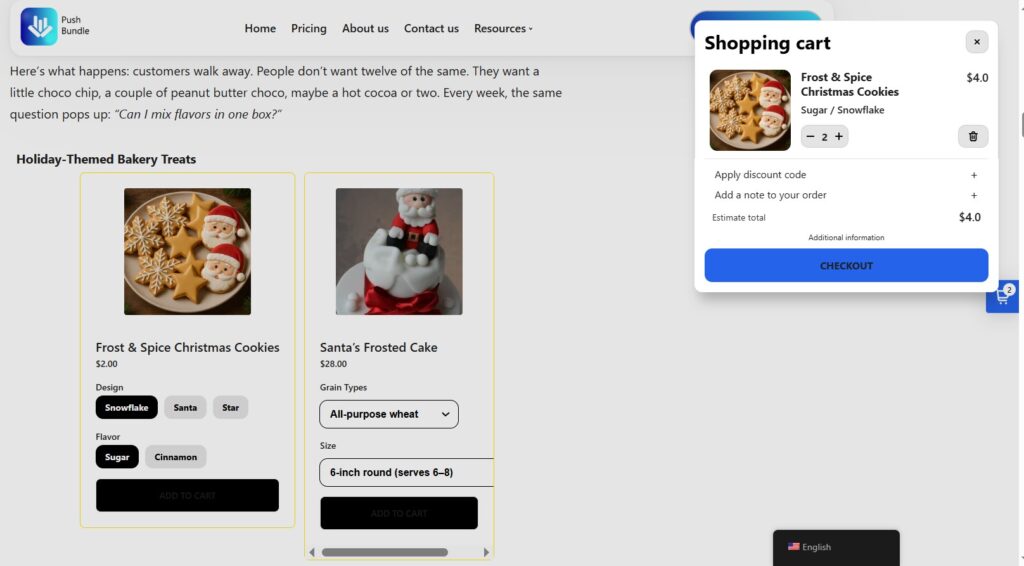
This is one of the best Sell on WordPress alternative because the differences go beyond just where it works. They’re about what happens once a customer engages with the embed.
Checkout stays on the page where the customer already is. Customers browse, select variants, and complete the purchase without ever leaving the site they landed on. There’s no redirect, no broken flow, and no lost momentum right before conversion.
Elementor compatibility is not an issue. EmbedUp generates a standard embed code. If your WordPress site uses Elementor, you paste it into a Custom HTML widget, and it works the same way it would in a Gutenberg block, on a Wix page, or anywhere else that accepts HTML. The app has no dependency on any specific page builder.
Affiliate and partner tracking is built into the Pro plan. You can create affiliate partners, assign product components to specific partners, track sales per partner, and manage commissions from a single dashboard. If you work with bloggers or content creators who promote your products, you get full visibility into which partnerships are actually driving revenue.
Bundle support is available on Growth and Pro plans. You can create fixed product bundles with set products, variants, and quantities, and offer one-click checkout on the bundle. If you already use a Shopify bundle app, EmbedUp supports those bundles directly, so nothing needs to be rebuilt.
The no-code component builder also gives you real control over how the embed looks. You can adjust layout, colors, button text, and cart behavior to match whatever site you’re embedding on. Custom CSS is available on higher plans for more precise control.
On pricing: the free plan includes one component and up to three products, which is a reasonable way to test whether it fits your setup before committing. The Growth plan at $14.99 per month unlocks ten components, bundle creation, advanced customization, and bulk checkout. The Pro plan at $29.99 per month adds affiliate management, commission tracking, UTM attribution, and per-partner sales reporting. Paid plans include a five-day free trial with no credit card required.
Sell on WordPress vs EmbedUp: Side by Side
| Feature | Sell on WordPress | EmbedUp |
|---|---|---|
| Price | Free | Free plan; from $14.99/mo |
| WordPress (Gutenberg) | ✓ | ✓ |
| Elementor compatible | ✗ | ✓ |
| Webflow, Wix, other platforms | ✗ | ✓ |
| On-page checkout | ✗ (redirects to Shopify) | ✓ |
| Affiliate tracking | ✗ | ✓ (Pro plan) |
| Commission management | ✗ | ✓ (Pro plan) |
| Bundle support | ✗ | ✓ (Growth & Pro) |
| Inventory sync | ✓ | ✓ |
| No-code customization | Very limited | Full builder |
| Built by | Shopify | EFOLI, LLC |
| App Store rating | 1.5★ (4 reviews) | 5★ (1 review) |
Pricing and ratings as of May 2026. Verify current details on each app’s Shopify App Store listing.
Both apps are new, and neither has a large enough review sample to be statistically decisive. What matters more than the raw numbers is what those reviews actually describe. The EmbedUp review comes from a blogger who embedded product cards into WordPress posts with on-page checkout and specifically noted reduced drop-offs at checkout. The Sell on WordPress reviews describe broken builds, Elementor failures, and merchants reverting to older tools. The pattern is clear even at small scale.
Which One Is Right for You?
The answer depends almost entirely on how you use WordPress and whether you work with affiliate partners.
Sell on WordPress might work if:
Your site runs entirely on Gutenberg with no Elementor or other page builders, you only need basic product or collection display, and you’re not working with affiliate partners or any other external sites. Budget is also a factor; it’s free, and if Shopify resolves the stability issues in future updates, it could be a solid option for simple setups.
EmbedUp is the stronger choice if:
You use Elementor or any page builder other than Gutenberg; you want customers to check out without being redirected off the page; you work with affiliate bloggers, partner sites, or content creators and need to track and pay commissions; you sell or plan to sell on platforms beyond WordPress; or you want bundle selling, UTM tracking, or any meaningful attribution data on your embedded products.
The honest summary is that Sell on WordPress was a promising idea that isn’t fully delivering yet. EmbedUp costs money, but it works across more situations and does significantly more. For merchants who are serious about turning external content into a real sales channel, that difference matters.
FAQ: Best Sell on WordPress Alternative
Does Sell on WordPress work with Elementor?
No. Sell on WordPress only works with the Gutenberg block editor. If your site uses Elementor, it won’t function as expected.
Can EmbedUp replace Sell on WordPress completely?
For most merchants, yes. EmbedUp does everything Sell on WordPress does (embed products, sync inventory, Shopify checkout) plus adds on-page checkout, affiliate tracking, and multi-platform support.
Does EmbedUp work on sites other than WordPress?
Yes. EmbedUp works on Webflow, Wix, landing pages, and any site that accepts embed code, not just WordPress.
Is Sell on WordPress really free?
The plugin itself is free, but you need an active Shopify plan to use it. EmbedUp also has a free starter plan, though paid features (affiliate tracking, more components) start at $14.99/month.
Can I track affiliate sales with either app?
Only EmbedUp. Sell on WordPress has no affiliate or commission tracking. EmbedUp’s Pro plan ($29.99/month) includes full affiliate management, sales attribution, and payout tracking.
Final Word
Sell on WordPress is free and made by Shopify, so it’s an understandable first stop. But right now, it’s a narrow tool with real stability problems, and for anyone on Elementor, it’s not even an available option.
EmbedUp is the more capable sell on WordPress alternative for merchants who want to embed Shopify products on WordPress and actually convert those visitors, whether they use Gutenberg or not, and whether WordPress is their only platform or one of several.
For a broader look at how EmbedUp compares to other options in this space, the full guide to best Shopify Buy Button alternatives covers the landscape in detail.