Your Blog Has Readers But Zero Revenue
You have thousands of blog readers every month. None of them are buying anything from you. AdSense pays fifteen dollars. Affiliate links generate maybe two hundred dollars.
But you could be making two thousand dollars. The gap between your actual revenue and potential revenue is in product sales.
Here’s the frustrating part. You don’t want to build a separate Shopify storefront. You’d redirect your audience away from your blog. They’d forget about your content. Traffic would collapse completely.
So you feel stuck between two bad choices. Either give up on monetization or abandon your blog audience. There’s actually a third option that works better. Let us find out what that is.
- Blogs lose revenue when readers leave the page before reaching checkout.
- EmbedUp lets creators embed Shopify products directly inside blog content.
- Readers can view products, choose options, and checkout through Shopify.
- The guide explains affiliate, reseller, and digital product monetization models.
- Start with one high-traffic post, test products, and scale winners.
Table of Contents
The Answer: Embed Shopify Products Directly Into Your Blog Posts
Embed Shopify products directly into your blog posts. Readers discover products while reading your content. They buy without leaving your blog ever.
You earn commission or profit without asking them to abandon your blog. This is how successful bloggers monetize blog with Shopify products effectively.
The best part: it only takes 30 days to set up. You don’t need a separate storefront. You don’t need to rebuild your website either.
According to Baymard Institute, the average eCommerce cart abandonment rate is 70.19%. A big reason for this is extra steps between interest and checkout.
When readers have to leave your blog, find a product, and navigate to a checkout page they’ve never seen before, many simply stop. But when products appear inside your posts?
Readers go from interested to checkout in one click. No leaving. No distractions. Just reading and buying inside your trusted content.
Why Most Blogs Lose Sales (And How to Fix It)
The Problem: Readers finish your post and leave.
Most fashion blogs send readers away to buy from other websites. A reader finishes your outfit post and clicks a link. They land on a brand homepage.
Now they have to find the product. They add it to the cart. They complete checkout on a site they’ve never visited before.
Many readers stop somewhere in that journey. This is the gap between content and commerce. Your blog did the hard work. Your blog built trust.
Your blog created desire. But the buying experience happened somewhere else entirely. That’s one massive problem for fashion bloggers.
The Solution: Keep readers on your blog and let them buy there.
When you monetize blog with Shopify products inside your posts, everything changes. Your reader finishes your content.
They see a product widget. They click buy. They go directly to Shopify checkout. Done.
Two steps instead of seven. The entire buying experience stays within your trusted content. That’s why conversion rates skyrocket.
What Is EmbedUp? And How Does It Work?
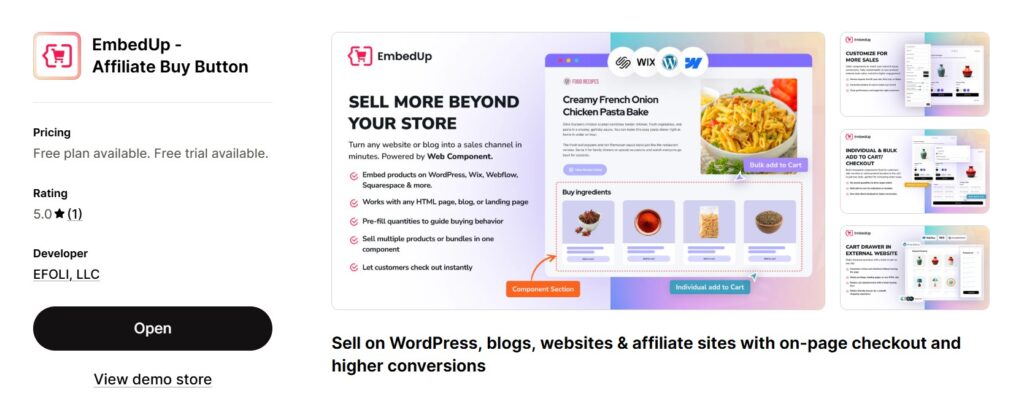
EmbedUp is a Shopify buy button alternative app that connects to your Shopify store and turns any product into an embeddable widget.
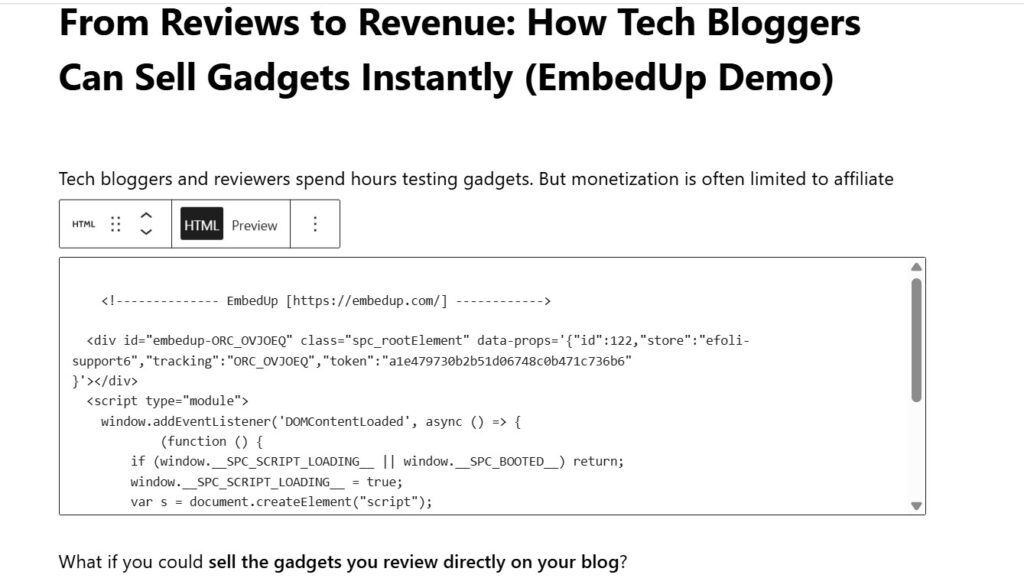
After you select your Shopify products, EmbedUp provides a code. You paste the short code into your blog post like this:
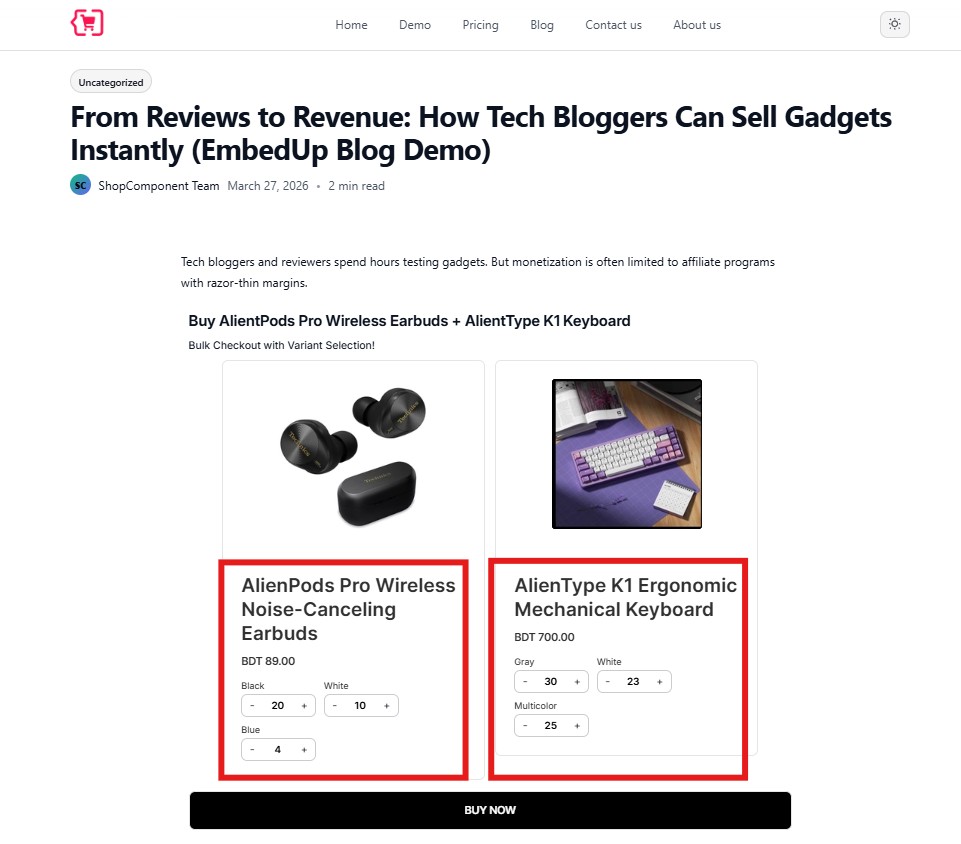
The product appears right there inside your content. Your reader sees this:
- Product photo and name
- Price and product description
- Variant options like size or color
- A “buy now” button
When they click the buy button, they go directly to Shopify’s secure checkout page. The entire transaction is handled by Shopify.
EmbedUp simply brings the product to where the reader already is. No redirects. No leaving your content.
Important: EmbedUp works exclusively with Shopify products. You can embed:
- Your own Shopify products
- Shopify products from brand partners and affiliates
- Collections and bundles from your Shopify store
- Products from other merchants’ Shopify stores (if they share components with you)
EmbedUp does NOT work with Amazon, WooCommerce, or other platforms. Only Shopify.
How to Monetize Blog with Shopify Products: A 5-Step Guide
To monetize blog with Shopify products, you need a Shopify store and EmbedUp. That’s it. No developer. No coding.
Most bloggers have their first product live in under 20 minutes. Here’s exactly how.
Step 1: Set Up Your Shopify Store
Add your products with photos, pricing, and descriptions. Connect a payment method using Shopify Payments.
This is your backend. Readers will never see the Shopify store itself. They only see products embedded inside your blog.
Time needed: 10-15 minutes
Step 2: Install EmbedUp From the Shopify App Store
Go to the Shopify App Store. Search for EmbedUp. Click install.
Follow the setup wizard. You’re asked to connect your blog platform and configure basic settings. Takes about five minutes total.
Time needed: 5 minutes
Step 3: Create a Component in EmbedUp
Pick the Shopify product or collection you want to embed inside your blog. Choose a layout style.
Customize colors and button styling to match your blog’s aesthetic. EmbedUp generates a short embed code.
Copy this code. You’ll paste it into your blog post next.
Time needed: 3-5 minutes per product
Step 4: Paste the Code Into Your Blog Post
Paste the EmbedUp code right after the paragraph where you recommend the product. Works on WordPress, Webflow, Wix, Squarespace.
Also works on Ghost, Substack, and any custom HTML blog platform. If your blog platform allows HTML, it works.
Pro tip: Paste the widget where reader interest is highest. Usually right after you describe or style the product.
Not at the top of the post. Not at the very end. Right where readers trust your recommendation most.
Time needed: 2 minutes per post
Step 5: Track Sales With Built-in UTM Tracking
EmbedUp includes UTM tracking so you can see which posts drive purchases. You can see which products convert best too.
This tells you which content topics attract buyers, not just readers. It’s your data engine.
Time needed: Automatic (no setup needed)
The 30-Day Monetization Blueprint
You don’t need months to start earning. Here’s the fastest path from zero to real revenue in 30 days.
Week One: Foundation Setup (Days 1 to 7)
Day 1: Make the decision. “I’m going to monetize my blog this month.” Don’t overthink it.
Day 2: Create a free Shopify store. Go to shopify.com. Sign up. Choose a free plan. Takes three minutes.
Your store URL will be something like yourname.myshopify.com. That’s fine for now.
Day 3: Add Shopify products to your store. Decide: will you sell your own products?
Or will you add Shopify products from affiliate brands? Or both? If selling your own, add them to Shopify now.
If promoting affiliate Shopify products, partner with brands that offer affiliate programs first.
Day 4: Set up payment processing. Shopify Payments is easiest. Takes ten minutes.
Customers can pay with credit card. You get paid weekly to your bank account.
Day 5: Download EmbedUp. Search the Shopify App Store. Install the app.
Follow the setup wizard. Total time is about five minutes. Easy.
Day 6: Connect your blog to EmbedUp. If your blog is WordPress, install the EmbedUp plugin.
If it’s Substack, Webflow, or Wix, create an embed code. Paste it into your template. Done.
Day 7: Test everything end-to-end. Write a test blog post.
Embed one product using EmbedUp. Make sure it loads correctly. Click through to Shopify.
Complete a test purchase using a test credit card. Verify the entire flow works. You’re ready.
Total setup time across seven days: Maybe three hours. Most of it is thinking, not technical work.
Week Two: Build and Launch (Days 8 to 14)
Days 8-10: Identify which blog posts will feature products. Look at your most popular posts.
Posts about fashion, home decor, food, fitness, tech, books, and productivity sell well. Posts mentioning specific products are perfect.
Days 11-12: Embed products into your top 5 posts. Write short paragraphs recommending products.
“I use this kitchen scale for all my baking. It’s accurate and fits any counter.”
Then embed the product. Include your affiliate link or your own Shopify product.
Day 13: Write a new blog post built around product recommendations. “My top productivity tools I use daily.”
Recommend real tools you actually use. Embed Shopify products next to each recommendation.
This post is designed to sell, not just inform. Be authentic.
Day 14: Email your blog subscribers about new products. Don’t be salesy about it.
Say: “Check out the tools I mentioned in today’s post. I put links right in the article.”
That’s it. You’ve now launched your product strategy. You should see clicks within 24 hours.
Week Three: Test and Measure (Days 15 to 21)
Days 15-17: Analyze which products people clicked on. EmbedUp shows click-through data.
Which products got views? Which got clicked? Which got purchased? Look for patterns in the data.
Day 18: Swap underperforming products for better ones. If no one clicked the expensive item, replace it.
Keep what works. Kill what doesn’t. This is called optimization.
Day 19: Create another new post. Focus on products people actually clicked on.
Write about those categories. Embed more products in that proven niche.
Day 20: Launch an email campaign about your favorite products. Make it “here are my favorites.”
Not a sales email. Include the embedded products. This reaches your newsletter audience directly.
Day 21: Review your revenue. You should have made $100 to $500 by now.
This depends on blog traffic and affiliate commission rates. If lower, check your click-through rate.
If clicks are low, your product recommendations don’t match your audience’s needs.
Week Four: Scale and Optimize (Days 22 to 30)
Days 22-25: Identify your highest-converting products. Which products got most clicks and sales?
Double down on those. Write more content around those categories. Embed them in more places.
Day 26: Create a “shop” page on your blog. Curate your top products there.
Make it easy for readers to browse everything available. A shop page often outperforms embedded products.
Some readers prefer browsing over reading recommendations about individual items.
Day 27: Optimize product descriptions inside Shopify. Add more photos. Write detailed descriptions.
Explain benefits clearly. When customers click your embed and land on Shopify, the product page should feel polished.
It should feel like a real storefront, not a hastily thrown together product.
Day 28: Set up a welcome email sequence. When new blog subscribers join your list, send them:
“Welcome to my blog. Check out my favorite products here.” Include your product shop link.
This introduces monetization to new subscribers immediately.
Day 29: Review your first month earnings. Calculate average revenue per post.
Calculate average revenue per email sent. Track conversion rate (readers to buyers). Celebrate whatever you made.
You monetized in 30 days. Most creators never do this.
Day 30: Plan month two. What worked? What didn’t? What products resonated?
Where should you expand next? You’ve proven monetization works. Now you scale it aggressively.
Expected earnings by Day 30: $500 to $2,000. This depends on blog traffic and niche fit.
- Food blogger with 10,000 readers typically earns $800 to $1,500
- Tech blogger with 5,000 readers might earn $500 to $1,200
- Fashion blogger with 10,000 readers could earn $1,000 to $2,000
Monetize Blog with Shopify Products: Three Proven Models
You have three paths to monetize blog with Shopify products. Each has different economics and complexity.
Model One: Affiliate Revenue (Lowest Effort)
You don’t own the products. You recommend Shopify products from affiliate brand partners.
You earn 5-20% commission on sales. No inventory. No customer service.
Setup: Zero. Find affiliate programs. Embed their Shopify products. Earn commission.
Risk: Zero. You don’t handle inventory or customer service at all.
Revenue: $200 to $1,000 per month for a blog with 10,000 monthly readers.
Best for: Bloggers who want income without operational complexity or hassle.
Model Two: Reseller Model (Moderate Effort)
You buy products wholesale. You sell them at retail markup on your Shopify store.
You handle order fulfillment, customer service, and returns yourself.
Setup: Moderate. You need supplier relationships. You need inventory management systems.
Risk: Medium. You’re tied up in inventory. Unsold products cost you money.
Revenue: $1,000 to $5,000 per month for blog with 10,000 monthly readers. Depends on margins.
Best for: Bloggers who want higher margins and can manage operations.
Model Three: Own Digital Products (Highest Income)
You create and sell digital products like courses, ebooks, templates, or presets on Shopify.
Zero shipping costs. Near-zero product costs. Very high margins (70-90%).
Setup: High effort. You need to create the product. But once created, it scales infinitely.
Risk: Low. No inventory risk. Only content quality risk matters here.
Revenue: $2,000 to $10,000+ per month for blog with 10,000 readers. Depends on quality.
Best for: Bloggers with expertise and ability to spend weeks creating products.
Most Successful Blogs Use All Three Models Together
Here’s how to combine them:
- Month 1-2: Launch with affiliate revenue. Fast setup. No inventory risk.
- Month 3-4: Add your own Shopify products for higher margins.
- Month 5+: Create digital products for passive income. These scale infinitely.
Together, all three models create diversified revenue that’s stable and growing.
Real Case Study: Fashion Blogger Monetizes in 30 Days
A fashion blogger named Sarah had 5,000 monthly readers. She wrote about outfit styling and capsule wardrobes.
She earned zero revenue. But readers constantly asked: “Where do you buy your clothes?”
Sarah decided to monetize blog with Shopify products using this exact blueprint.
Days 1-7: She set up a Shopify store. She partnered with five fashion brands as affiliates.
Most offered 15-20% commissions on Shopify sales. She installed EmbedUp.
Days 8-14: She edited her top five blog posts. Posts about “capsule wardrobe essentials” got embedded products.
Posts about “how to build a minimalist closet” got recommendations. Posts about “affordable luxury fashion” got links.
Days 15-21: She reviewed her data. Her “capsule wardrobe” post generated 80 clicks and 5 sales.
Total commission: $180. Her “affordable luxury” post got 40 clicks and 2 sales ($95).
Her “outfit combinations” post got 10 clicks and zero sales.
Key insight: Capsule wardrobe content sells. Affordable luxury sells. Generic outfit posts don’t.
Days 22-30: She wrote three new “capsule wardrobe” posts. Each embedded relevant Shopify products.
By month-end, she’d earned $890 total. She’d monetized in 30 days exactly.
Month 2: She created a digital product. “Capsule Wardrobe Builder Workbook” for $27.
She embedded it in her top posts. By month three, she was earning $1,200 per month total.
By month six: She was earning $3,000-$4,000 per month from her blog.
She hadn’t changed her content strategy. She’d just added a revenue layer using EmbedUp.
Result: Her blog became a profitable business without sacrificing content quality.
Why Embedding Shopify Products Works So Well
The core insight is simple: readers are most engaged when reading your content.
That engagement moment is when they’re most likely to buy. Sending them somewhere else breaks that engagement.
Compare two scenarios:
Scenario 1 (Old Way – Loses Sales):
Reader finishes your blog post. You mention a product. “Click here to see more details.”
Reader clicks a link. They leave your blog. They land on a random website.
They get distracted. They compare prices. They abandon the purchase. You lose the sale.
Scenario 2 (New Way – Makes Sales):
Reader finishes your blog post. You mention a product. Product widget appears immediately.
Reader sees photo, price, and reviews. They click “buy.” They go to Shopify checkout.
Checkout is fast. They buy. You make the sale. And they never left your blog.
The conversion difference: Scenario 2 converts at 2-3x the rate of Scenario 1.
This is exactly why monetize blog with Shopify products works so effectively. You meet readers where they already are.
Technical Setup: EmbedUp Works On Any Blog Platform
The beauty of monetize blog with Shopify products is that it works everywhere.
Supported platforms:
- WordPress: Install the EmbedUp plugin. Connect to your Shopify store. Add blocks in editor. Done.
- Substack: Copy embed code into post HTML editor. Products display in your newsletter automatically.
- Webflow: Paste custom embed code into custom code block. Works seamlessly.
- Wix: Copy embed code into custom HTML widget. Integrates with your Shopify store.
- Squarespace: Paste code into custom content block. Fully supported.
- Ghost: Add embed code in HTML block. Works great on Ghost blogs.
- Custom HTML: Any platform that allows HTML pasting works with EmbedUp.
The common thread: EmbedUp handles all the technical complexity. You just paste code or click buttons.
No coding required. No developer needed.
Common Monetization Mistakes to Avoid
Mistake 1: Embedding Random Products
Readers want recommendations that match your content. Embed products that relate to your blog topic.
A food blogger recommending kitchen gadgets makes sense. Recommending laptops doesn’t.
Mistake 2: Recommending Products You Don’t Use
Readers sense inauthenticity immediately. Only recommend products you’ve actually used and loved.
Your credibility is your most valuable asset. Don’t waste it on unauthentic recommendations.
Mistake 3: Burying Products in Unrelated Posts
“Here’s my morning routine. By the way, buy this coffee maker.” Awkward and jarring.
Better approach: write content around products. “The coffee maker that changed my mornings.” Feels natural.
Mistake 4: No Email Follow-up
Blog readers who don’t buy on first visit forget about your recommendations. You lose the sale.
Solution: email them later. “Remember that camera I mentioned? Here’s why I love it.”
Email conversions are higher than blog post conversions for product sales.
Mistake 5: Not Testing Different Products
Launch products. Track which ones sell. Keep winners. Kill losers.
Iterate continuously based on data, not guesses.
Mistake 6: Forgetting About Existing Audience
You have email subscribers. Newsletter readers. Social media followers. Tell them about products.
“Check out the tools I use and recommend.” Include embed links. Existing audience converts best.
Conclusion: Start Monetizing Your Blog Today
Monetize blog with Shopify products when the offer makes buying easy for your readers. The right approach should help customers choose faster, see value clearly, and build a better cart. You don’t need a separate storefront. You don’t need to redirect readers away from your blog. Just embed Shopify products inside your posts. Keep readers engaged. Let them buy right there. This is how blogs become profitable businesses. Start with one post.
Take your most-read post from the last 90 days. Find where you mention a product. Add an EmbedUp widget right there. Publish it. Watch what happens over one week. Most creators never monetize blog with Shopify products because they think it’s complicated. It’s not. It’s 30 days. It’s five steps. It’s one decision. Make that decision today. Monetize blog with Shopify products. Your readers are ready to buy.
FAQ: Monetize Blog with Shopify Products
How much blog traffic do I need to monetize?
Minimum is 5,000 monthly readers. Sweet spot is 10,000+. But you can start at 3,000 if your audience is highly engaged.
Should I focus on own products or affiliate?
Start with affiliate. It’s faster to launch. No inventory risk. Own products take weeks to create.
Own products pay better long-term. Do both simultaneously once you’re comfortable with affiliate setup.
How do I choose which products to recommend?
Recommend products you love and actually use. If you’re not using it, don’t recommend it.
Authenticity drives conversion. Also notice what readers ask about. “What do you use?” signals interest.
Can I embed products on Substack or other newsletter platforms?
Yes. EmbedUp works with most platforms. Paste embed code into your newsletter template.
Products display in the email or newsletter page. Readers click directly to Shopify checkout.
How much revenue can I realistically make?
With 10,000 monthly readers and moderate effort: $500 to $2,000 per month.
With 20,000 readers and high effort: $2,000 to $5,000 per month.
With 50,000+ readers: $5,000 per month or more.
What products sell best from blogs?
Products that solve a problem your readers have. Fashion bloggers sell fashion items.
Tech bloggers sell gadgets. Parenting bloggers sell parenting tools. Match product to audience pain point.
Is passive income really passive with EmbedUp?
For affiliate sales: yes. Set it and forget it. But you should test and optimize regularly.
For own products: semi-passive. Create once. Market it ongoing. You can’t fully abandon it.
How do I track which recommendations make money?
EmbedUp shows click data. Shopify shows sales. Email platforms show link clicks.
Use UTM codes to track sources. “utm_source=blog_post_name” tells you which post drove sales.
Can I embed Shopify products AND run a store?
Yes. Your main Shopify store is your storefront. EmbedUp on your blog drives additional sales.
They work together perfectly. Blog traffic supplements store traffic.
Do I need permission to embed products?
For your own Shopify store: no. For affiliate Shopify products: yes, check affiliate terms.
Most allow embedding as long as you use proper affiliate links and disclose the relationship.