Content Commerce Examples: How 6 Industries Sell Through Content
 Syeda Rehnoma Tanzom24 min read
On this page
- What is content commerce?
- Content commerce examples by industry at a glance
- Why the same tactic works differently in each industry
- Fashion brands: selling the look, not the item
- Fitness brands: selling at the point of the plan
- Food brands: selling the ingredients in the recipe
- Beauty brands: selling the routine inside the tutorial
- Supplement brands: selling after the education
- Creator commerce: selling from a personal website
- Mistakes that hurt content commerce in every industry
- How to choose your first content commerce placement
- Where your products should live: your Shopify blog, an external site, or a partner's page
- How to measure content commerce in each industry
- Content commerce and AI search
- Limitations of content commerce
- Conclusion
- FAQ
Picture two Shopify brands adding buy buttons to their blogs on the same day. The hot sauce brand puts a three-sauce kit right under a taco recipe, and orders start coming in from that page. The supplement brand puts a "buy now" button above its magnesium explainer, and readers leave before they reach the second paragraph. (Both brands are illustrative.)
Same tool, very different results. Most content commerce examples and advice on how to sell products through content treat every industry the same way: put products in your content. But a recipe needs several products at once, a makeup tutorial needs the right shade, and a supplement page needs trust (and careful wording) before it needs a button.
That's why what works in one industry doesn't copy well into another. The wrong format or placement wastes content you worked hard on, and in categories like supplements and skincare, the wrong wording can create real risk.
This guide shows how six industries sell through content, where the buying decision happens in each, what to put on the page, which rules to check, and how to choose your first placement.
Short answer: Content commerce is selling products inside the content people already read, such as blog posts, recipes, tutorials, and guides. Each industry does it differently: fashion brands sell the full look in outfit posts, fitness brands sell gear inside workout plans, food brands sell ingredient kits under recipes, beauty brands sell routines inside tutorials, supplement brands sell after educational content, and creators sell their picks from their own websites. The common rule is to put the product where the reader makes the decision and to follow your category's claim and disclosure rules.
TL;DR
Content commerce means readers can buy from the content itself instead of clicking away to a store.
Each industry sells through a different format: outfits, plans, recipes, tutorials, explainers, or a creator's own site.
Put the product at the moment the reader decides: beside the look, in the equipment list, under the ingredients, or at the routine step.
Sets work best when one decision needs several products (fashion, food, beauty); single products work best in reviews and supplement pages.
Supplements, beauty, and fitness have claim rules from the FDA and FTC, and every paid partner or creator needs a clear disclosure.
Start with one high-intent page you already have, measure it for 60–90 days, then expand.
What is content commerce?
Content commerce is selling products directly inside content, such as a blog post, recipe, tutorial, guide, or creator page, so a reader can choose a product and add it to the cart without leaving the page. Payment then runs through the store's checkout, which for Shopify brands means Shopify checkout.
It's different from content marketing, which earns attention and then sends readers somewhere else to buy. It's also different from social commerce, where the purchase happens inside a social app. Content commerce happens on pages you or your partners own.
You'll see it in two forms. Some brands publish their own content to sell their own products. Others work with publishers, bloggers, and creators who sell the brand's products on their sites. The mechanics behind both, and how shoppable content commerce works from one page to a whole library, are the same. What changes by industry is the kind of content that sells and the point where the reader decides. A post only becomes shoppable when the reader can act at that point, and what makes a blog post shoppable comes down to placement more than to the button itself.
Content commerce examples by industry at a glance
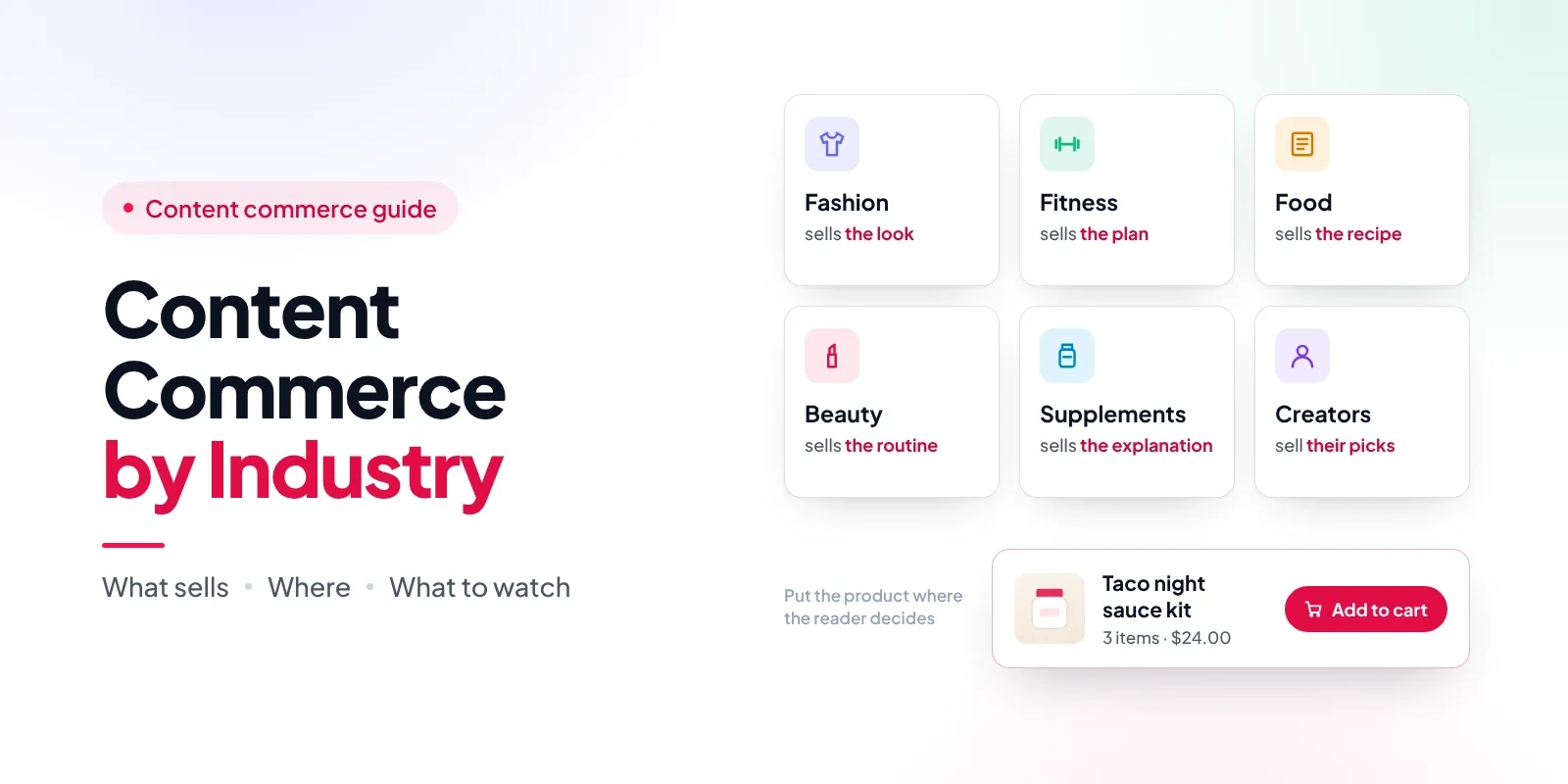
Every industry sells through a different kind of content, at a different moment. We call this the Content-to-Cart Map: for each industry, it shows the content that sells, where the decision happens, what to put on the page, the main risk, and what to measure.
Industry | Content that sells | Where the decision happens | What to put on the page | Main risk to manage | What to measure |
|---|---|---|---|---|---|
Fashion | Outfit posts, lookbooks, styling guides | When the reader sees the full look on a person | The full outfit as a set, sizes visible | Size and fit doubts; sold-out sizes | Add-to-cart per look; return reasons |
Fitness | Workout plans, training guides, gear reviews | When the plan lists the equipment needed | Gear matched to the plan's level | Results claims and before/after testimonials | Sales per plan or program page |
Food | Recipes, meal plans, cooking guides | At the ingredient list | An ingredient kit sized to the recipe | Allergens; shipping perishables | Kit adds vs single-item adds |
Beauty | Tutorials, routines, shade guides | When the tutorial names the exact product and shade | The routine as a set, with shade options | Drug-like claims; shade mismatch | Sales per tutorial; shade-related returns |
Supplements | Ingredient explainers, "how to choose" guides, FAQs | After the reader understands what it does and doesn't do | One product or a starter pack, below the education | Disease claims; missing FDA disclaimer | Repeat purchases from content buyers |
Creator commerce | A creator's own site, blog, or newsletter archive | When the creator explains why they use it | The creator's picks, credited to them | Missing disclosures; unclear credit | Sales per creator placement |
Content commerce by industry starts with this table: find the row for your category, then read that section below. If you sell in two categories, such as fitness gear and supplements, use the stricter rules of the two.
Why the same tactic works differently in each industry
Three things explain almost every difference in the map: how many products one decision needs, how much proof the reader needs before buying, and who creates the content.
Basket: A recipe needs several ingredients, and an outfit needs several pieces. A supplement page usually sells one product. The bigger the basket, the more a ready-made set helps.
Proof: Nobody needs a study to buy a T-shirt, but a supplement or an acne cleanser needs explanation and trust first. The more proof a product needs, the further down the page the buy button should sit.
Voice: Content written by your brand, a partner, or a creator sells in different ways. Partner and creator content needs a disclosure and a fair way to credit sales.
One thing doesn't change across industries: every extra step between "I want this" and checkout costs sales. The Baymard Institute puts the average online cart abandonment rate at 70.22%, based on 50 studies. Making a reader leave a recipe or tutorial, find the product again in your store, and pick the right variant adds steps before they've even reached the cart.
Fashion brands: selling the look, not the item
Fashion content sells when the reader sees a complete outfit on a person, so the best placement is the whole look, with sizes visible, right beside the image.
Content that sells: outfit posts, lookbooks, capsule wardrobe guides, and "three ways to wear" styling posts. These pages answer the question a fashion shopper actually has, which is "what do I wear this with?"
Where to put the product: directly next to or under each outfit image. Readers decide on the look as a whole, so a product placed in a sidebar or at the bottom of the post misses the moment.
What to put on the page: the full outfit as one set, plus the option to buy each piece on its own. Separate links for a top, trousers, a belt, and shoes ask the reader to rebuild the outfit in your store, one product page at a time. Size options should be visible on the card so readers can check their size before they commit.
What to watch: size and fit doubts are the main reason fashion shoppers hesitate, so put a link to your size guide near the product rather than at the end of the post. Stock matters too. An old lookbook that still shows a sold-out size frustrates readers, which is why products embedded with live inventory sync age better than screenshots and copied links. If you pay stylists or bloggers to feature the look, they need a clear disclosure.
Illustrative example: A small knitwear brand publishes "Three ways to wear one cardigan." Each outfit sits in its own product set, and the cardigan appears in all three, so readers who like one look can buy it in a single step.
Bloggers and brands that want to go further with this format can find a step-by-step approach to selling outfits from a fashion blog without losing readers, including where the product block performs best inside a post.
Fitness brands: selling at the point of the plan
Fitness content sells when a plan tells the reader what equipment they need, so put the gear inside the plan, matched to the reader's level.
Content that sells: workout programs, beginner training guides, "home gym on a budget" posts, and honest gear reviews. Readers come to these pages with a goal, and the plan gives them a reason to buy now rather than someday.
Where to put the product: in the equipment list at the start of the plan, or in week one of a program. That's the moment the reader is deciding whether they can start.
What to put on the page: gear that matches the plan's level. A beginner plan should show the lighter band set or the adjustable kettlebell, not the full range. Starter sets work well, because the reader wants to know they have everything for day one.
What to watch: results content is where the risk lives. The Federal Trade Commission (FTC) says that if an advertiser doesn't have proof that an endorser's experience represents what people will generally achieve, the ad must make clear what results people can generally expect. That applies to before-and-after stories and "I lost 10 pounds in a month" testimonials. Health-related claims also need competent and reliable scientific evidence under the FTC's Health Products Compliance Guidance.
Illustrative example: A resistance band brand publishes a four-week beginner plan. The band set appears in week one with a note on which resistance level to start with, and the heavier set appears in week four as the next step.
Many fitness brands and trainers publish on WordPress rather than on their Shopify store, and embedding fitness gear in WordPress workout posts keeps the plan and the product on the same page.
Food brands: selling the ingredients in the recipe
Food content sells at the ingredient list, so the strongest placement is a kit of the recipe's specialty ingredients, sized to the recipe.
Content that sells: recipes, meal plans, seasonal cooking guides, and "how to use" posts for a specific ingredient. Recipes are already part of how people shop. In Chicory's 2024 State of Online Recipes report, online recipe usage among U.S. respondents reached 91%.
Where to put the product: right at or next to the ingredient list. That's the moment the reader checks what they have and what they need.
What to put on the page: the ingredients readers can't easily get at a regular supermarket, which are usually your products: the spice blend, the sauce, the specialty flour. Leave out the onions and the eggs. Size the kit to the recipe's servings, so a reader who wants to make dinner for four doesn't have to work out how many jars to buy.
What to watch: allergens and shipping. The U.S. Food and Drug Administration (FDA) lists nine major food allergens: milk, eggs, fish, crustacean shellfish, tree nuts, peanuts, wheat, soybeans, and sesame (sesame since January 1, 2023). Make allergen information easy to find from the product on the recipe page, not just on the label. If your products are perishable, make shipping limits clear before the reader adds the kit.
Illustrative example: A hot sauce brand publishes a smoky chicken taco recipe. Under the ingredient list sits a three-sauce kit with mild, medium, and hot, plus each sauce on its own for readers who already have the others.
Recipe sites work this way for both brands and food bloggers, and the details of selling recipe ingredients from recipe content, from kit choice to tracking which recipe made the sale, follow the same logic.
Beauty brands: selling the routine inside the tutorial
Beauty content sells when a tutorial names the exact product and shade, so put the routine, or the products for each step, inside the tutorial with shade options visible.
Content that sells: step-by-step tutorials, morning and evening routines, shade guides, and "get the look" posts. Beauty has a long history of content coming before the product. Glossier, founded in 2014, started as an online-only business that built on Emily Weiss's beauty blog, Into the Gloss.
Where to put the product: at each step of the tutorial, or as one routine set at the end of the steps. The reader decides when they see the result and know which products and shades produced it.
What to put on the page: the routine as a set, with the option to buy each step alone. Shade or skin-type options should be on the product card, because a reader who has to guess their shade on another page often doesn't come back.
What to watch: claims. The FDA says a product's intended use can be shown by claims "on the product labeling, in advertising, on the Internet, or in other promotional materials." A cleanser intended to treat acne or a shampoo intended to treat dandruff is regulated as a drug, or as both a drug and a cosmetic. Tutorial copy is promotional material, so "this serum clears acne" in a blog post can matter as much as it would on the label.
Illustrative example: An indie skincare brand publishes "A three-step morning routine for dry skin." The cleanser, serum, and moisturizer appear as one set, and the copy talks about how skin feels and looks, not about treating a condition.
Bloggers who review and teach makeup face the same placement questions from the other side, and turning makeup tutorials into sales shows how preset kits and tracking work in that setting.
Supplement brands: selling after the education
Supplement content sells after the reader understands what the product does and doesn't do, so the button comes below the explanation, never above it.
Content that sells: ingredient explainers, "how to choose" guides, comparison pages (for example, two forms of the same mineral), dosage FAQs, and honest "who this is not for" sections. Supplements need more proof than any other category on this list, and good education is how a brand provides it.
Where to put the product: after the reader has the answer they came for. A product card at the top of an explainer asks for a decision before the reader has the information to make one.
What to put on the page: usually one product, or a starter pack for readers who want to try it. Subscriptions suit repeat buyers, but they're a separate decision and usually need a subscription app.
What to watch: this is the most regulated category on the list, and this isn't legal advice, so check the rules with your own advisor. Under FDA rules, a supplement label with a structure/function claim must carry the disclaimer: "This statement has not been evaluated by the Food and Drug Administration. This product is not intended to diagnose, treat, cure, or prevent any disease." The FTC's Health Products Compliance Guidance says health claims need competent and reliable scientific evidence, applies to social media and influencer marketing, and says that "It's not enough that a testimonial represents the honest opinion or experience of an endorser." An educational page that sells a product is advertising, so the same care applies there.
Illustrative example: A magnesium brand publishes "Magnesium glycinate vs citrate: how to choose." The page explains the difference, who each form suits, and what the research does and doesn't show. The product card appears after the comparison, with the FDA disclaimer beside the claim it applies to.
One wellness brand took this education-first approach by putting a product card on a content page that works as its storefront, with the product story and education placed before the purchase option.
Creator commerce: selling from a personal website
Creators sell best from pages they own, such as a blog, a newsletter archive, or a "what I use" page, where they explain why they use each product and the brand can credit each sale to them.
Content that sells: a creator's own reviews, "my kit" pages, gift lists, and newsletter posts archived on the web. These pages carry the creator's voice, which is the reason their audience buys. Partner selling is a large channel: the Performance Marketing Association's 2025 Industry Study reports that U.S. affiliate marketing spend reached $13.62 billion in 2024 and drove about $113 billion in ecommerce sales.
Where to put the product: next to the creator's own explanation of why they use it. The recommendation is the decision point.
What to put on the page: the creator's picks from your catalog, set up so each sale is credited to that creator. Social posts, videos, and podcasts can't hold an embed, so creators still need a link or code for those channels.
What to watch: disclosure and credit. The FTC says the words "affiliate link" alone may not tell readers that the creator is paid, and that "a 'buy now' button would not be adequate" as a disclosure. It also says brands are "ultimately responsible for what others do on your behalf," so give creators simple disclosure wording. On the credit side, Shopify Collabs, Shopify's app for creator partnerships, isn't accepting new creator signups as of November 2026, though merchants can still invite creators and accept applications.
Illustrative example: A coffee gear brand gives its three top creators a "my brewing setup" product block on their own blogs, credited to each creator, and a personal code for Instagram and YouTube.
The choice between a link and an embed depends on the partner and the page, and choosing between affiliate links and embeds for each partner comes down to where that partner's readers decide. Once creators sell on their own sites, tracking partner sales and paying commissions becomes the next job.
Mistakes that hurt content commerce in every industry
The same six mistakes show up in every category, and each one has a simple fix.
Embedding the whole catalog. A collection grid under a recipe or tutorial looks like an ad. Show only what the content recommends.
Putting the product before the decision. A buy button above the outfit, the plan, the ingredient list, or the explanation asks too early. Move it to the decision point from the map.
Using separate links when the decision needs a set. If the content recommends four products together, offer them together.
Letting old posts go stale. Prices change and products sell out. Embedded products that sync from Shopify stay accurate; screenshots and copied prices don't.
Writing claims in content that you couldn't put on your label. Blog posts, tutorials, and explainers count as promotion.
Leaving partner content without a disclosure or a credit plan. Agree on both before the post goes live.
Choosing what to feature is as important as how it's shown, and product recommendations readers trust are the ones that match the content's promise rather than the brand's bestseller list.
How to choose your first content commerce placement
Start with one page that already gets traffic from people close to buying, put the product at its decision point, and measure it before you expand. This five-step content commerce strategy works for any of the six industries.
Find your highest-intent page. Look for a recipe, tutorial, plan, or comparison page that already ranks or gets steady traffic. Reviews and "how to choose" pages usually beat brand stories.
Find the decision point. Use the map: the full look, the equipment list, the ingredient list, the named shade, the end of the explanation, or the creator's reason.
Pick the format. Choose a single product, a set, or a short collection based on how many products the decision needs.
Check your category's rules. Look at claims (supplements, beauty, fitness), allergen information (food), and disclosures (any paid partner).
Measure for 60–90 days. Track orders, add-to-cart clicks, and revenue per visit for that page, then add the next page.
Placement and tone decide whether the product feels like help or an interruption, and a shoppable blog post that doesn't feel forced starts from the reader's question, not the product.
Where your products should live: your Shopify blog, an external site, or a partner's page
If your content is on your Shopify online store, your theme is usually the simplest place to show products. If it's on WordPress, Wix, Squarespace, Webflow, or a partner's site, you need a way to embed products from Shopify.
Where the content lives | Native Shopify option | Limits to know | App option |
|---|---|---|---|
Your Shopify online store blog | Your theme's product sections, where your theme has them; cart permalinks | Depends on your theme | Not needed for most brands |
An external blog you own (WordPress, Wix, Squarespace, Webflow) | Shopify Buy Button channel (included in all Shopify plans); Storefront Web Components for developers | Shopify doesn't recommend Buy Buttons on your own Shopify store; Web Components aren't supported by Shopify Support | An embed app such as EmbedUp for product cards, collections, and preset bundles |
A partner's or creator's site | Buy Button channel; Shopify Collabs for links and codes | The Buy Button channel doesn't directly tie a button to a partner without additional steps; Collabs isn't accepting new creator signups | EmbedUp Pro to assign a product block to a partner and track their sales |
Email, social posts, video, podcasts | Cart permalinks, links, and discount codes | Embeds can't run in these places | Links and codes |
Shopify's Buy Button channel is free and works well for simple needs, but it helps to know where Shopify's Buy Button falls short before you use it across a whole content library. Most brands with an external blog run WordPress, and embedding Shopify products on WordPress takes a pasted script rather than a rebuilt site. If you're comparing tools, a short list of checks for choosing an embed app covers sync, checkout, and tracking.
EmbedUp, a Shopify app by EFOLI for selling products on external websites, is one option here. Its free Starter plan includes one component with up to three products. Preset bundles with fixed products and quantities, one-click add-all-to-cart, and an inventory check before checkout are on the Growth plan ($14.99/month). Partner assignment, commission tracking, and order-level attribution are on the Pro plan ($29.99/month).
How to measure content commerce in each industry
Measure sales per page, not just traffic, and add one industry-specific signal from the map.
For every industry, track orders, revenue, and add-to-cart clicks for each page that sells. Revenue per visit is the fairest way to compare a long tutorial with a short review. Then add the signal that matters most in your category: add-to-cart per look for fashion, kit adds vs single-item adds for food, shade-related returns for beauty, repeat purchases for supplements, and sales per creator for partner content.
Tag every link you control with UTM parameters. Shopify's order conversion summary can show the referrer and UTM details for an order, but it can be limited when cookies are blocked, so don't treat it as a complete record. Embedded products that report sales by placement make page-level results easier to see. EmbedUp's Pro plan adds campaign analytics with UTM tracking and order-level attribution.
Content commerce and AI search
AI assistants increasingly cite pages that answer real questions clearly, so a well-written recipe, tutorial, or explainer can be both cited and shoppable. You control your own content; you don't control how AI tools rank or describe products.
That makes industry content worth more, not less. An ingredient explainer or a routine tutorial that answers a question in plain language gives an AI assistant something to cite, and the product block gives the reader who clicks through something to buy. It's worth understanding what happens after an AI assistant cites your post, and the case for whether AI shopping replaces content commerce is weaker than the headlines suggest.
Limitations of content commerce
Content commerce works best when the content already attracts readers close to a decision. It has real limits:
It doesn't create demand. If nobody reads the page, an embed won't change that.
Low-intent content rarely sells directly. Brand stories and company news build trust, but readers seldom buy from them.
Some products need to be tried first. Clothing fit, shade matching, and taste still cause returns, whatever the content says.
Regulated categories limit what content can say. Supplements, skincare, and fitness results content need careful wording.
Embeds need a page that can run a script. Email, most social posts, video, and podcasts can't hold one, so links and codes still matter.
Attribution is never perfect. Readers who leave and buy later in your store may not be credited to the page that convinced them.
Tool limits apply. On EmbedUp, the free plan covers one component with up to three products, preset bundles need Growth, partner tracking needs Pro, and partner commissions are paid by the brand outside the app.
Conclusion
The content commerce examples that work share one habit: the product appears where the reader makes the decision. In fashion that's the full look, in fitness it's the equipment list, in food it's the ingredient list, in beauty it's the named shade, in supplements it's the end of a clear explanation, and in creator commerce it's the creator's reason for using it.
Start with one page you already have, use the Content-to-Cart Map to place the product, check your category's rules, and measure before you expand. If your content lives outside Shopify, EmbedUp is one way to put synced products, sets, and partner tracking on those pages.
FAQ
What is an example of content commerce?
What is the difference between content commerce and content marketing?
Which industries benefit most from content commerce?
Is content commerce the same as social commerce?
Do I need a Shopify blog to do content commerce?
How do I track which content made a sale?
Can supplement brands sell through educational content?
Do partner and creator posts need a disclosure if they use a buy button?
What should I embed first: one product or a bundle?
Related articles
 Embed Shopify Products
How to Make a Shoppable Holiday Gift Guide Readers Can Buy From
Last checked: 2 November 2026, against the EmbedUp App Store listing, embedup.com, ShipStation's 2026 holiday shipping deadlines, and the NRF 2026 holiday forecast. Who this is for: Shopify merchants, bloggers, and content teams who publish a holiday gift guide on a blog or website. Reading time: about 16 minutes.
17 min read
 Embed Shopify Products
How to Make Money From a Makeup Blog With Shopify (2026 Guide)
Learn how beauty bloggers can turn makeup tutorials, reviews, and product recommendations into earning opportunities. Discover five common challenges of selling Shopify products through blogs and how EmbedUp helps merchants and bloggers create shoppable content, manage affiliate partnerships, and track sales.
16 min read
 Content Commerce
How to Choose Product Recommendations in Blog Posts Readers Trust
Learn how to choose product recommendations for blog posts that genuinely help readers make buying decisions. Discover how many products to feature, how to organize them, and how to build trust without turning your content into a sales list.
16 min read