Instagram Posts in the Shop App vs Your Own Site: Where Each Wins
 Syeda Rehnoma Tanzom15 min read
On this page
- What is Shopify's Instagram sync to the Shop app?
- What syncs, and what you need
- How to connect Instagram to Shop
- Where synced posts appear
- What the new shop.com adds
- Shop app vs your own site: a side-by-side comparison
- Where the Shop app wins
- Where your own site and partner sites win
- When to use both: a simple split
- Should you turn on Shopify Instagram sync?
- How EmbedUp fits
- Limitations to know
- Conclusion
Say your brand posts three Reels a week, runs a blog with a few gift guides and comparisons, and works with a handful of creators. After Shopify's Fall '26 Edition, a new option appears in your admin: Shopify Instagram sync, which turns those Reels and carousels into shoppable posts inside the Shop app.
It's an easy switch to turn on. The harder question is what it means for everything else you publish. If your Instagram content can sell inside Shop, does your blog still matter? Do partner pages? And when someone buys from a post in Shop, whose customer are they?
These questions matter because content time is limited. Put everything into Shop and the pages where people compare and decide go stale. Ignore Shop and you miss an audience that's already shopping.
This guide explains what the Instagram sync and the new shop.com actually do, compares them side by side with shoppable content on your own site, and shows how to give each one a clear job.
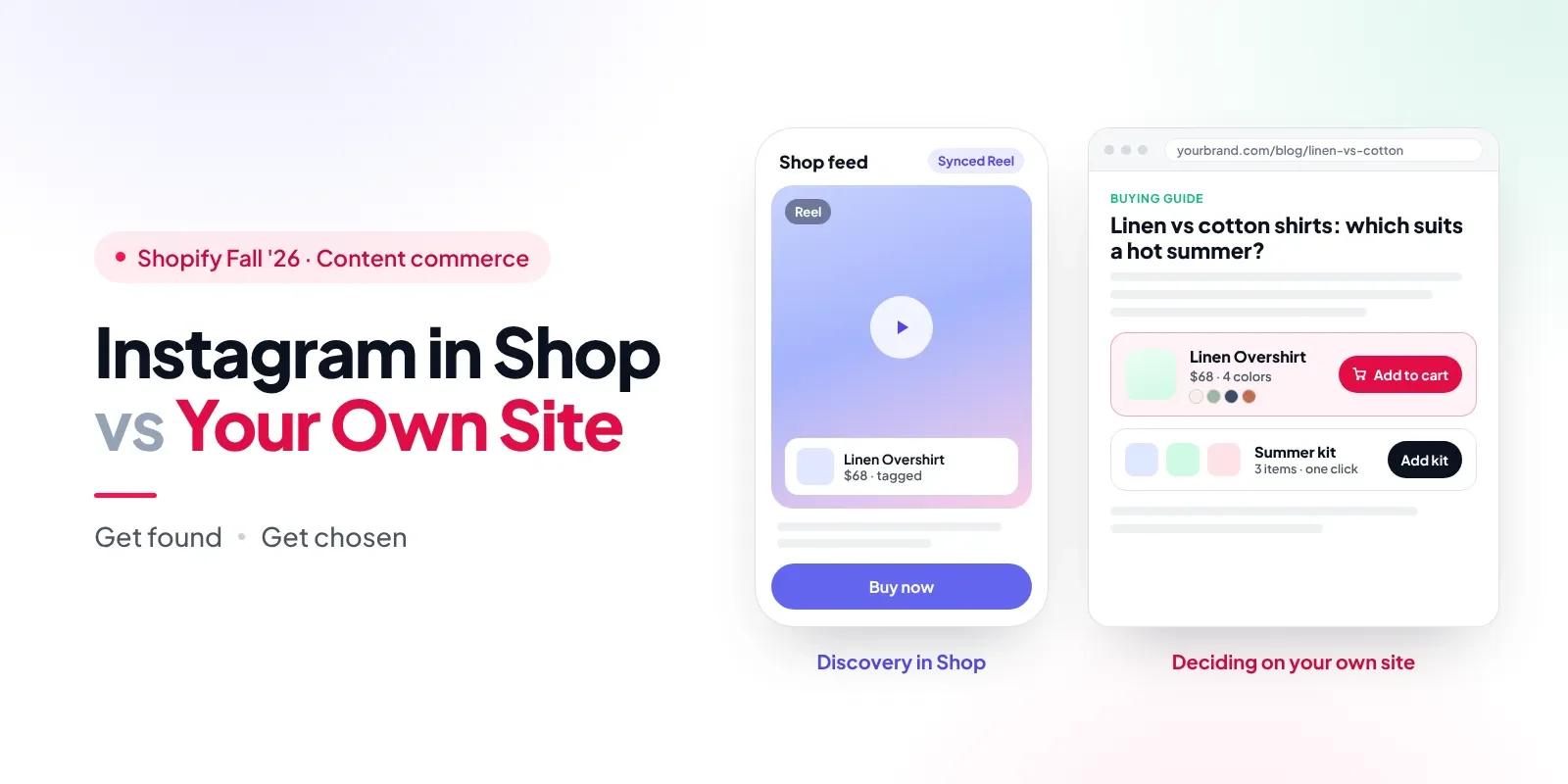
Short answer: Turn on Shopify Instagram sync if Instagram already works for you. It puts your Reels, images and carousels in front of Shop app and shop.com shoppers with almost no extra work, and they can buy in a tap. But Shop is Shopify's surface: Shopify controls the feed, the ranking and the layout, and its analytics report at the channel level. Content that helps people choose, such as guides, comparisons, bundles and creator reviews, still sells best on your own site and partner sites, where you control the page and can track each placement. Use Shop to be found and your own pages to be chosen.
TL;DR
Shopify's Instagram sync imports Reels, image posts and carousels into Shop as shoppable posts, from a Creator or Business account.
The new shop.com adds shoppable posts, editorial curations, personalized sections and package tracking on the web.
Shop wins on reach to shoppers who don't follow you yet and on fast, one-tap checkout.
Your own site and partner sites win on design, content depth, bundles, per-page tracking and search.
Most brands should use both: short visual content in Shop, deeper buying content on the blog and partner sites.
Embed tools such as EmbedUp put Shopify products, collections and bundles on pages outside your store, including partner sites.
What is Shopify's Instagram sync to the Shop app?
Shopify's Instagram sync is a Shop channel feature that connects your Instagram account to Shop and automatically imports your Reels, image posts and carousels as Shop posts. Once you tag products, those posts become shoppable in the Shop app and on shop.com. Shopify announced it in the Fall '26 Edition with the line "Connect your Instagram to Shop and automatically sync reels, images, and carousels into rich, shoppable content in the app."
It's easy to mix Shopify Instagram sync up with the Facebook & Instagram sales channel, which syncs your catalog to Meta so you can tag products inside Instagram itself. The Instagram sync works the other way around. It brings your Instagram content into Shopify's Shop app, where Shop shoppers see it and buy from it.
What syncs, and what you need
According to Shopify's Help Center page on Shop posts:
You need a Creator or Business Instagram account. Personal accounts aren't supported.
Staff need the Marketing permission to create and manage posts in Shop.
When you connect, Reels, image posts and carousels from the last 90 days are imported, with their captions.
New Instagram posts are imported and published to Shop automatically.
You can turn off auto-publishing. Posts are still imported but stay unpublished until you publish them yourself.
That 90-day import is worth a quick check. If an older post mentions a sale that has ended, it will come across with the same caption.
How to connect Instagram to Shop
In your Shopify admin, go to Sales channels > Shop.
Click Posts.
Click Manage apps.
In the Instagram section, click Set up.
Review what gets synced and the account requirements, then click Connect Instagram.
Sign in to Instagram and authorize the connection.
You can disconnect from the same Manage apps screen.
Where synced posts appear
Shop posts show in the Shop app and on shop.com: in the home feed, on your store's page in Shop, and in the Following tab for people who follow you. Since Shopify replaced Shop "Updates" with Posts in April 2026, posts aren't limited to your followers and are ranked by relevancy in the main Shop feed. You can edit a synced post to tag products, a collection or an active discount. A tagged discount shows as a badge on the post.
What the new shop.com adds
The Fall '26 Edition also launched a new shop.com, Shop's home on the web. Shopify describes it as having shoppable posts, editorial curations and sections personalized to each shopper, along with more detailed package tracking. Shopify also says traffic to Shop is growing faster on the web than in the app.
For merchants, this means shop app shoppable posts now reach people in a browser, not only those who installed the app. Shoppers can check out with Shop Pay, which Shopify says more than 400 million people already trust, and Shop's checkout lets them buy from several brands in one cart.
To sell directly in Shop, your store needs to meet Shop's requirements. These include Shopify Payments, a chargeback rate under 5% in the last 90 days, at least one fulfilled order and products that meet Shop's product rules.
Shop app vs your own site: a side-by-side comparison
Both are forms of shoppable content on Shopify, but they do different jobs. Here's how Instagram posts synced to Shop compare with shoppable content on your own blog and on partner sites.
Instagram posts in the Shop app | Shoppable content on your own site and partner sites | |
|---|---|---|
Reach | Shop app and shop.com shoppers, including people who don't follow you; posts are ranked by relevancy in the main feed | Your readers, search traffic, AI assistant citations and each partner's audience |
Who owns the shopper and the data | Orders appear in your Shopify admin as Shop channel sales. The feed, ranking, follows and the shopper's Shop account belong to Shop | The page, the audience and the tracking are yours or your partner's; orders go through your Shopify checkout |
Design control | Shop's layout: media, caption, optional headline, tagged products. Syncing your store's branding to Shop is in early access | Full control of the page, product card style and placement |
Content depth | Short visual posts and captions | Long guides, comparisons, tutorials, routines and reviews |
Checkout | Shop's accelerated checkout with Shop Pay; carts across brands | Shopify checkout; with an embed tool, checkout can run on the page itself (see the EmbedUp section) |
Analytics | Shop channel reports: Shop orders, Shop sales, referral orders and sales, product impressions | Your own analytics, UTM links, and per-placement tracking if your tool supports it |
Bundles | Tags single products or one collection | Fixed bundles and kits shown as one buyable set, with an embed tool that supports them |
Partner and creator sites | Not applicable; content lives in Shop | Partners can embed your products on their own pages |
Extra work | Very little once the sync is on | Writing and maintaining pages |
Two rows are worth slowing down for.
Ownership. Selling in Shop doesn't mean losing the order. Shop orders land in your admin like any other channel. What you don't control is the place the shopper found you. Shop decides what appears in its feed and in what order, and a shopper who follows you in Shop follows you inside Shopify's app. On your own site, you decide what the reader sees next.
Analytics. Shop's analytics page lists channel-level metrics such as Shop orders, Shop sales and product impressions. It doesn't list sales by individual post. If you need to know which piece of content sold what, you'll get that more easily from pages you track yourself.
Where the Shop app wins
The Shop app is the better place for content when the goal is discovery.
New reach for content you already make. With Shopify Instagram sync, your Reels and carousels get a second life in front of shoppers who may never have seen your Instagram account, with no new content work.
Quick, low-effort buying. A shopper who sees a product in a post can buy it with Shop's accelerated checkout. That suits impulse-friendly, visual products.
New drops and single products. A launch Reel with one or two tagged products is exactly the kind of content Shop's feed is built for.
Discount visibility. A tagged discount shows as a badge on the post, and automatic discounts apply in the cart.
If Instagram is already a working channel for you, there's little reason not to switch Shopify Instagram sync on.
Where your own site and partner sites win
Your own pages are the better place when a shopper needs help choosing.
Content that needs room. A "best running shoes for flat feet" comparison, a skincare routine, a gift guide by budget or a "how to choose" guide can't fit in a caption. These are the buying content such as comparisons and routine guides that brands in every industry use to sell, and the reader is usually close to a decision by the time they finish. Putting the product right after the explanation matters, and a shoppable blog post that doesn't feel forced is built around the reader's question first.
Bundles and kits. A routine with four products or a starter kit sells as a set. A Shop post tags products or a collection. A page on your own site can show the full kit with one button.
Your design and your next step. On your own site, you choose the layout, what comes after the product and where the reader goes next.
Tracking each page. When each page or partner has its own product block or UTM link, you can see which content sold, not only which channel.
Search and AI assistants. Search engines and AI assistants read pages, not Shop posts. Adobe forecasts that AI traffic to U.S. retail sites will rise 130% year over year this holiday season. A clear, well-structured guide on your site is what those assistants cite, and the product on that page is what happens after an AI assistant cites a shoppable post.
Partner and creator sites. Creators, bloggers and review sites publish on their own pages, outside Shop. Whether to give each one affiliate links or embedded products for each partner depends on where their readers make the buying decision.
When to use both: a simple split
The two don't compete if each type of content has a home. Here's a practical split for a brand that makes both social and long-form content.
Content | Where it goes | What to sell on it |
|---|---|---|
Reels, carousels, product photos | Instagram, synced to Shop | One to a few tagged products, or a collection |
New product drop | Instagram and Shop, plus a launch page on your site | The new product |
Comparison ("X vs Y") or "how to choose" guide | Your blog | One product per option you sell |
Gift guide | Your blog and partner gift guides | Products by budget or recipient, plus a fixed gift set |
Routine, recipe or tutorial | Your blog | The full kit as a bundle, plus single products |
Creator or affiliate review | The partner's site | The products they reviewed, tracked to that partner |
A simple workflow ties them together. A Reel shows the product in use and gets reach in Shop and on Instagram. The deeper guide on your blog answers the questions the Reel can't, with the products embedded where they're explained. Partners write their own versions, with your products on their pages. During peak season, a gift guide readers can buy from is a good example of content that belongs on your own site, even when its Reels go to Shop.
After a sale, both places need tidying. Shop posts can carry old discount badges and captions, and external product placements after BFCM need the same review on your blog and partner pages.
Should you turn on Shopify Instagram sync?
For most brands that already post on Instagram, yes. Use this list to decide.
Turn it on if:
You have a Creator or Business Instagram account and post product-focused content.
Your store already meets Shop's requirements, including Shopify Payments.
You want more reach for content you already make, without extra work.
Wait or keep auto-publishing off if:
Your last 90 days of posts mention offers that have ended. Review them first.
Much of your Instagram content isn't about products, such as memes or team posts. Publish selectively.
Some of your products aren't eligible for Shop. Posts that include products prohibited on Shop can be flagged.
Either way, the sync doesn't replace your own pages. It adds a discovery channel on top of them.
How EmbedUp fits
Shopify Instagram sync covers your social content inside Shop. It doesn't put products on your blog, your WordPress or Webflow site, or a partner's page. That's the other half.
If your blog runs on Shopify, your theme's product sections may be enough for simple cases. For pages outside your Shopify store, Shopify's Buy Button channel handles single products, but bundles and partner tracking need additional steps.
EmbedUp, a Shopify app by EFOLI, is one option for that half. It embeds Shopify products, variants, collections and preset bundles on blogs, WordPress, Webflow, Wix and partner sites, with prices, variants and inventory synced from your store. EmbedUp's site says shoppers can check out directly on the page, through Shopify's checkout opening in a popup, so the reader doesn't leave the article.
The free Starter plan covers one component with up to three products, enough to test one guide. Growth ($14.99/month) adds preset bundles with fixed products and quantities, one-click add-all-to-cart, default quantities per variant and an inventory check before checkout. Pro ($29.99/month) adds affiliate partners, components assigned to each partner, commission tracking, UTM campaign analytics and order-level attribution.
The same idea sits behind Shopify Catalog and placements you choose: Shopify's surfaces bring reach, and your own placements bring control. EmbedUp doesn't publish anything into the Shop app, so use the Instagram sync for that.
Limitations to know
Shop is Shopify's surface. Shopify decides ranking, layout and content policies. Posts that break Shop's content rules or include prohibited products can be flagged.
Account requirements. Shopify Instagram sync needs a Creator or Business Instagram account, and selling in Shop needs Shopify Payments and an eligible store.
Channel-level reporting. Shop's analytics page lists channel totals, not sales by post.
Own-site content takes work. Guides and comparisons need writing and upkeep, and search traffic builds over months.
Embeds need a website. They don't run inside Instagram, the Shop app or email.
Tool limits apply. On EmbedUp, the free plan covers one component with up to three products, preset bundles need Growth, and partner tracking needs Pro.
Conclusion
Shopify Instagram sync is a good addition for brands that already post on Instagram. It gives your Reels and carousels reach in the Shop app and on shop.com, with fast checkout, for almost no extra work. It doesn't replace the pages where people compare, read and decide.
Give each place a job. Let Shop help new shoppers find you, and keep guides, comparisons, bundles and partner reviews on your own site and partner sites, where you control the page and can see what each piece of shoppable content on Shopify sells. A good first step is to turn on the sync with auto-publishing off, review the imported posts, and pick one guide on your blog to make shoppable alongside it. If that guide lives outside your Shopify store, EmbedUp is one way to add products, collections and bundles to it.
What is Shopify's Instagram sync to the Shop app?
Is the Shop app Instagram sync the same as the Facebook & Instagram channel?
Do I need an Instagram Business account to sync posts to Shop?
Do Instagram posts in the Shop app replace my blog?
Who owns the customer when someone buys in the Shop app?
Can I see which Shop post made a sale?
Can I sell Shopify products on my blog and partner sites with checkout on the page?
- shopify instagram sync shop app
- shoppable instagram shopify
- shop app shoppable posts
- shoppable content shopify
Related articles
 Embed Shopify Products
Shopify Ghost: How to Sell Shopify Products on a Ghost Blog
Last checked: 23 November 2026. Who this is for: writers, newsletter creators and brands who publish on Ghost and want readers to buy products from their Shopify store without leaving the post.
15 min read
 Content Commerce
Creator Commerce: Selling Products From Your Personal Website
Creator commerce sells best on the creator's own website, where the product sits inside their explanation and every sale is traceable. Here's what to put on which page, how to set it up on Shopify, and what to measure.
20 min read
 Content Commerce
Supplement Brands Selling Through Educational Content: What Works
Supplement brands sell through educational content when the page answers the reader's question first, shows who the product fits, and only then offers it. Here's what to publish, where the product goes, and what you can safely say.
20 min read